
Keep Homebrew, Node and Ruby up to date from your menu bar.
DevHub finds what is outdated across your Mac, including every Node and Ruby version you have installed, and updates it in a click. Every command it runs is written to a history you can read.
Version 1.0.0 (3.0 MB). Apple Silicon and Intel. MIT license. Not notarized yet, so macOS asks you to approve it once. See how.
- Homebrew
- npm
- RubyGems
- nvm
- fnm
- Volta
- asdf
- RVM
- rbenv
- chruby
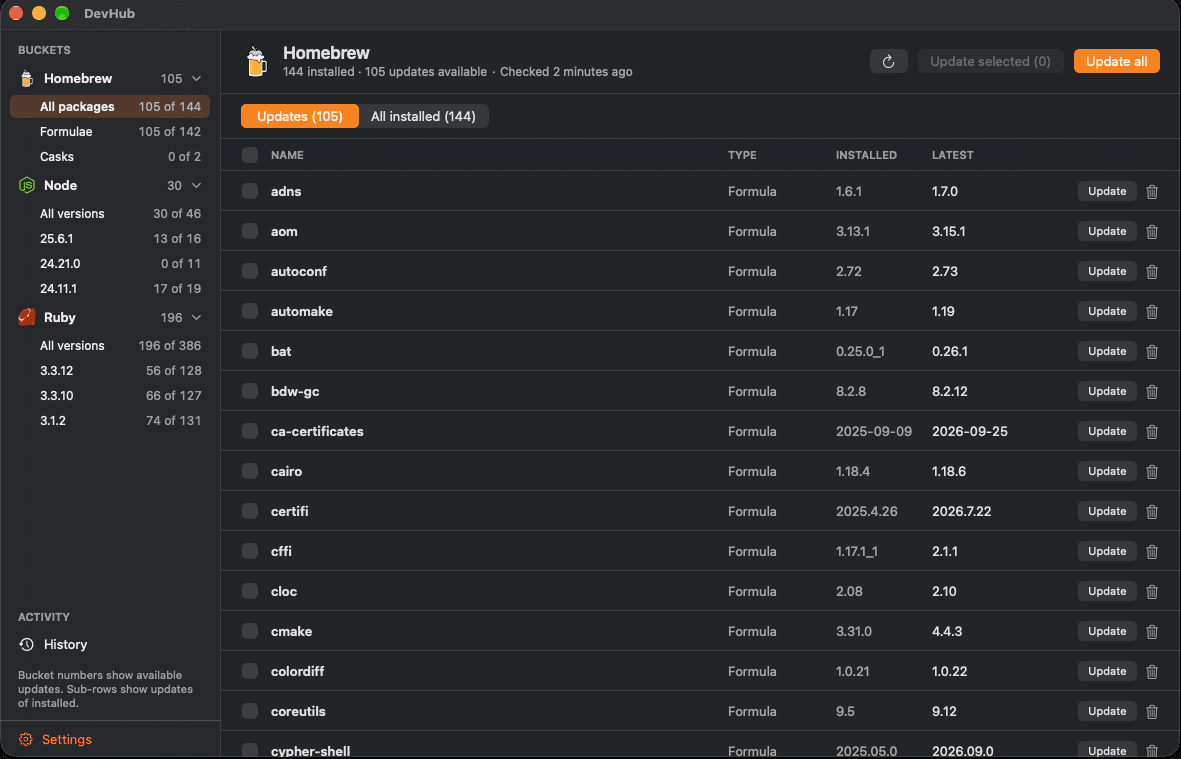
Everything outdated, sorted by where it lives.
A sidebar filters by tool, by Node version and by Ruby version, so a global package that is old in one Node and current in another is never hidden. Switch between what needs an update and everything installed, open the details pane for the path, disk size and dependents, and update or uninstall from the same row.
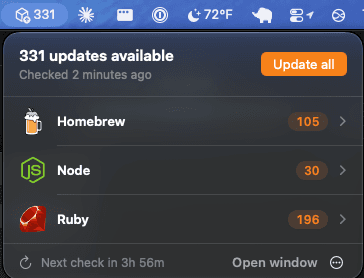
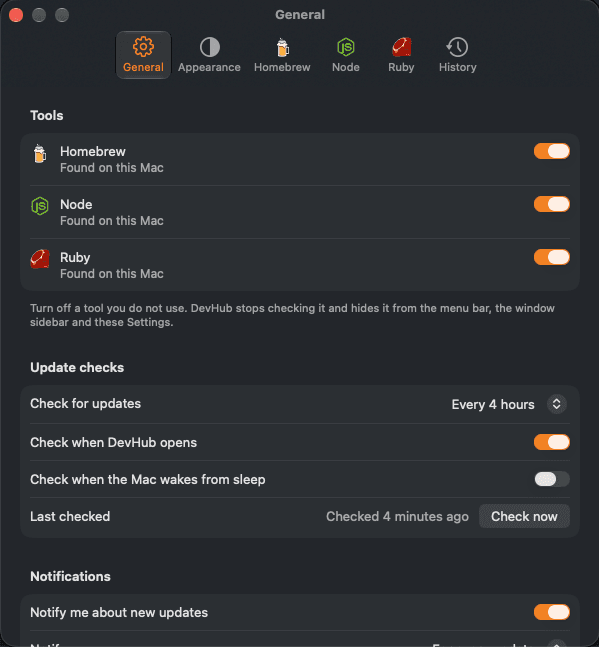
The count is one glance away.
The popover groups updates by tool. Update one package, update everything, or open the full window. Show an icon, an icon with the count, or only the count, and decide how often DevHub checks and what it tells you.
Made for people who live in a terminal.
It does the boring part of keeping a development machine current, and shows its work.
Update one, some or all
Update a package, a selection or everything, with a confirmation you can turn off. Cancel at any point.
Watch it work
A progress strip shows the package running, how many are done and how long it has been going. The output log streams what the tool prints.
Node updates that fit your Node
npm installs a version your Node cannot run and only prints a warning. DevHub reads each version's engine range and installs the newest one your Node supports.
A history of everything
Every check, update and uninstall is saved with its command, exit code and output, in a plain text file you own. Filter it, export it, keep it as long as you like.
Notifications on your terms
Hear about every update, get a daily summary, or only major versions. Checks run on a schedule, when DevHub opens, and when the Mac wakes.
Keyboard first
A shortcut for every action, arrow keys through the lists, and VoiceOver labels on every row.
Nine languages
Pick your language in Settings. The layout mirrors for right-to-left languages.
Light and dark
Follows your system, or stays on the setting you choose.
Private by design
No account, no analytics, and no network requests of its own. It never uses sudo.
It runs the tools you already have.
No private index and no background service. DevHub runs your own brew, npm and gem, using the right version of each, and reads what they print.
- 1Each Node and Ruby version uses its own npm and gem.
- 2One Homebrew command at a time, because Homebrew locks its files.
- 3A failed command shows its real output and exit code, and Try again runs it once more.
# Homebrew
$ brew outdated --json=v2
$ brew upgrade <name>

# Node, once per installed version
$ npm outdated -g --json
$ npm install -g <name>@<version>

# Ruby, once per installed version
$ gem outdated
$ gem update <name> --no-document
Your machine, your data, your call.
DevHub never asks for your password. If a package needs elevated rights, the update fails and the History page shows the real error.
There is no account and no analytics. Only the package managers it runs talk to the internet.
It lives at ~/Library/Logs/DevHub. Open it, export it or clear it any time.
Speaks your language.
Nine languages, with more welcome. The translations have not had a native review yet, so corrections are appreciated.
- English
- Deutsch
- Español
- Français
- Português (Brasil)
- Русский
- 日本語
- 한국어
- 简体中文
Up and running in a minute.
- 1
Download
Get the latest DMG from the releases page. It is a universal build for Apple Silicon and Intel.
- 2
Drag to Applications
Open the DMG, drag DevHub into Applications and open it. A package icon appears in your menu bar.
- 3
Approve it once
DevHub is not notarized yet. Open System Settings, then Privacy and Security, and choose Open Anyway next to DevHub.
$ xattr -dr com.apple.quarantine /Applications/DevHub.app$ brew install xcodegen $ git clone https://github.com/chiefpansancolt/devhub.git $ cd devhub && make run
Questions
Is DevHub free?
Yes. It is open source under the MIT license, and you can read every line of it on GitHub.
Why does macOS block it the first time?
The app is signed ad hoc and is not notarized yet, because notarization needs an Apple Developer account. After you approve it once, it opens like any other app.
Does it use sudo or ask for my password?
No. It runs everything as you. If a package needs elevated rights, the update fails and the History page keeps the full output so you can fix the cause.
Which Node and Ruby versions does it see?
Those installed with nvm, fnm, Volta or asdf for Node, and RVM, rbenv, chruby or asdf for Ruby. The macOS system Ruby is left out because its gems need sudo. If yours live somewhere else, choose the folder in Settings.
Does it send anything anywhere?
No. DevHub has no network code. Your settings stay in the app's preferences and your history stays in a file on your Mac.
Which Macs does it run on?
macOS 15 Sequoia or newer, on Apple Silicon or Intel.